
Arcane: GTA V Enhanced Cheat
Select Price Per Key
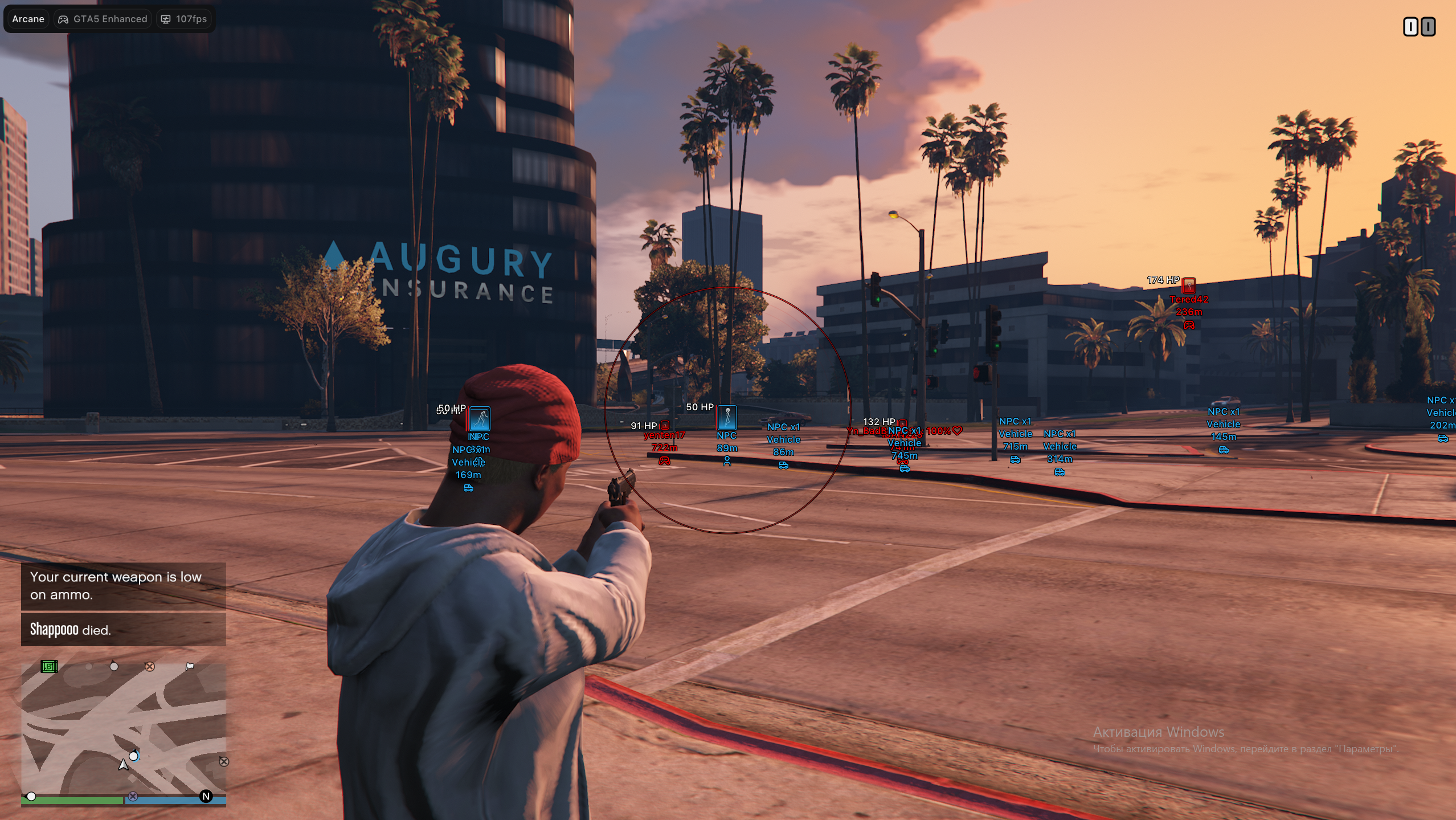
Arcane: GTA V Enhanced Cheat – Advanced Aimbot, ESP, Battle Mode & Utility Suite
The Arcane Menu is a powerful GTA V enhancement suite designed for players seeking advanced aiming tools, detailed ESP systems, and extensive gameplay customization. Compatible with Steam, Epic Games, and Social Club versions of GTA V, Arcane supports both Windowed and Borderless modes on Windows 10 and 11, delivering a smooth and responsive experience across a wide range of hardware configurations.
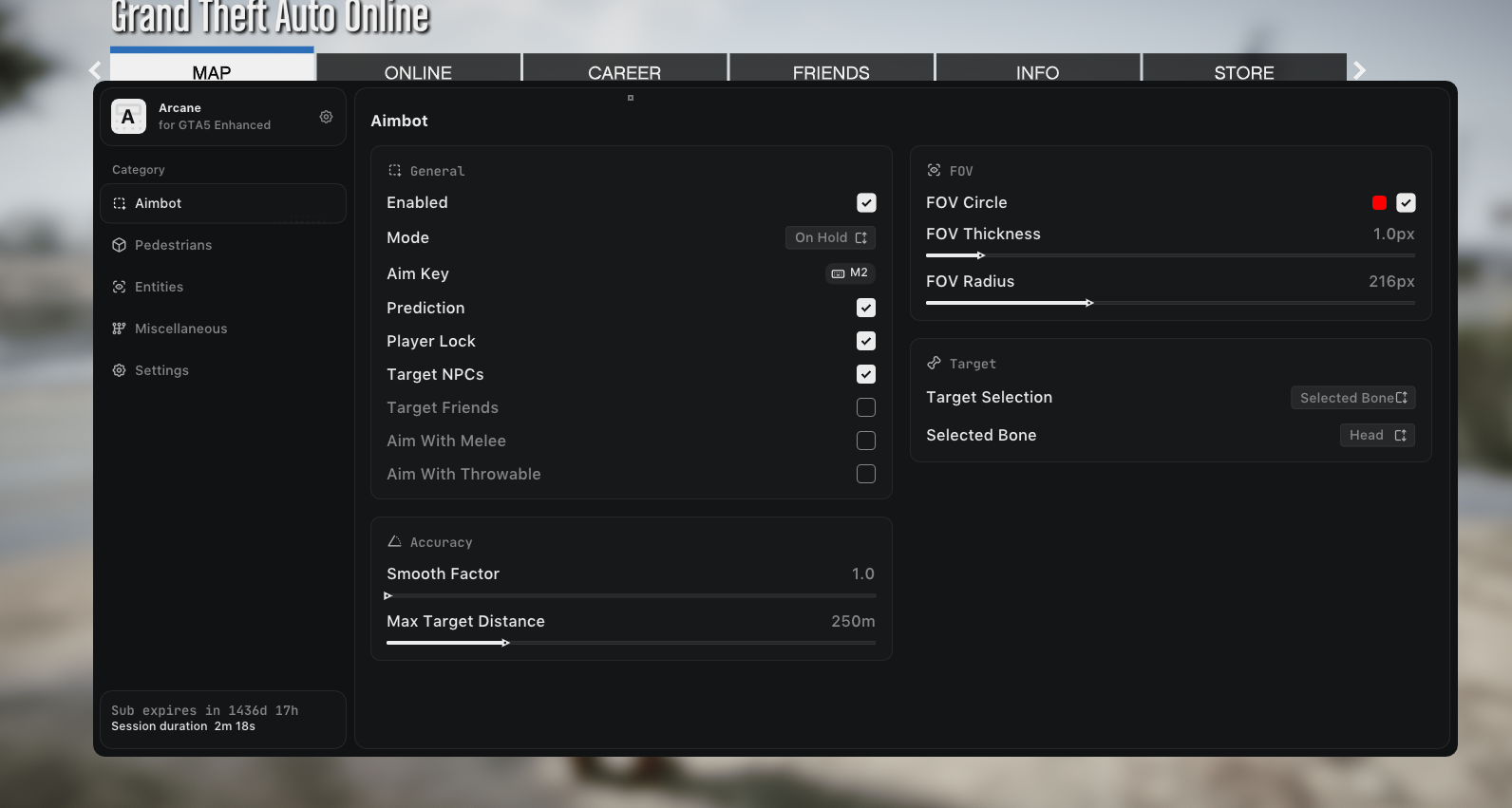
At the core of Arcane is its highly configurable Aimbot System. Featuring multiple aim modes, player locking, prediction technology, customizable FOV settings, and selectable target bones, Arcane provides precise control over targeting behavior. Users can configure separate options for players, NPCs, friends, melee weapons, and throwable weapons while adjusting smoothness, distance limits, and visual aim indicators to suit their preferred playstyle.
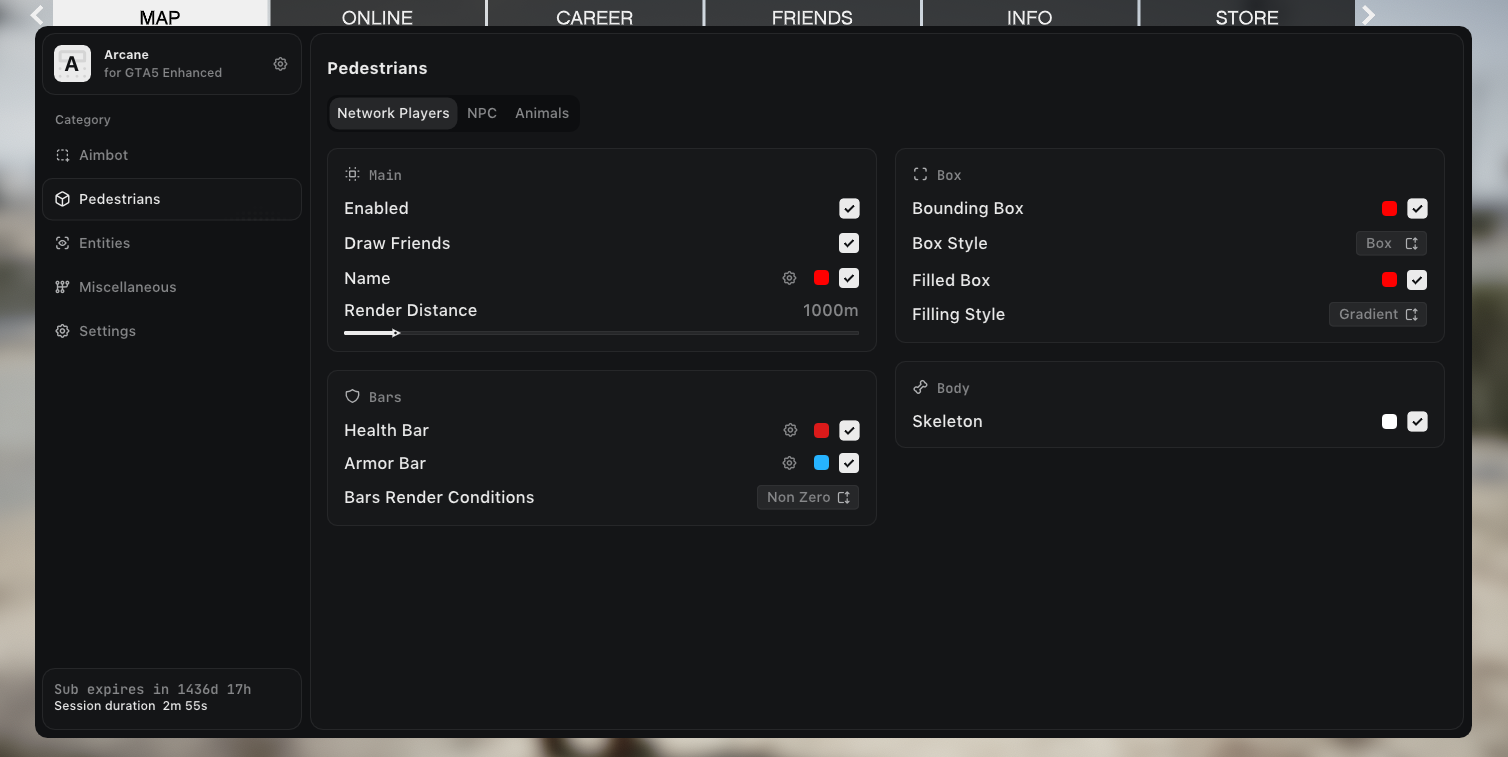
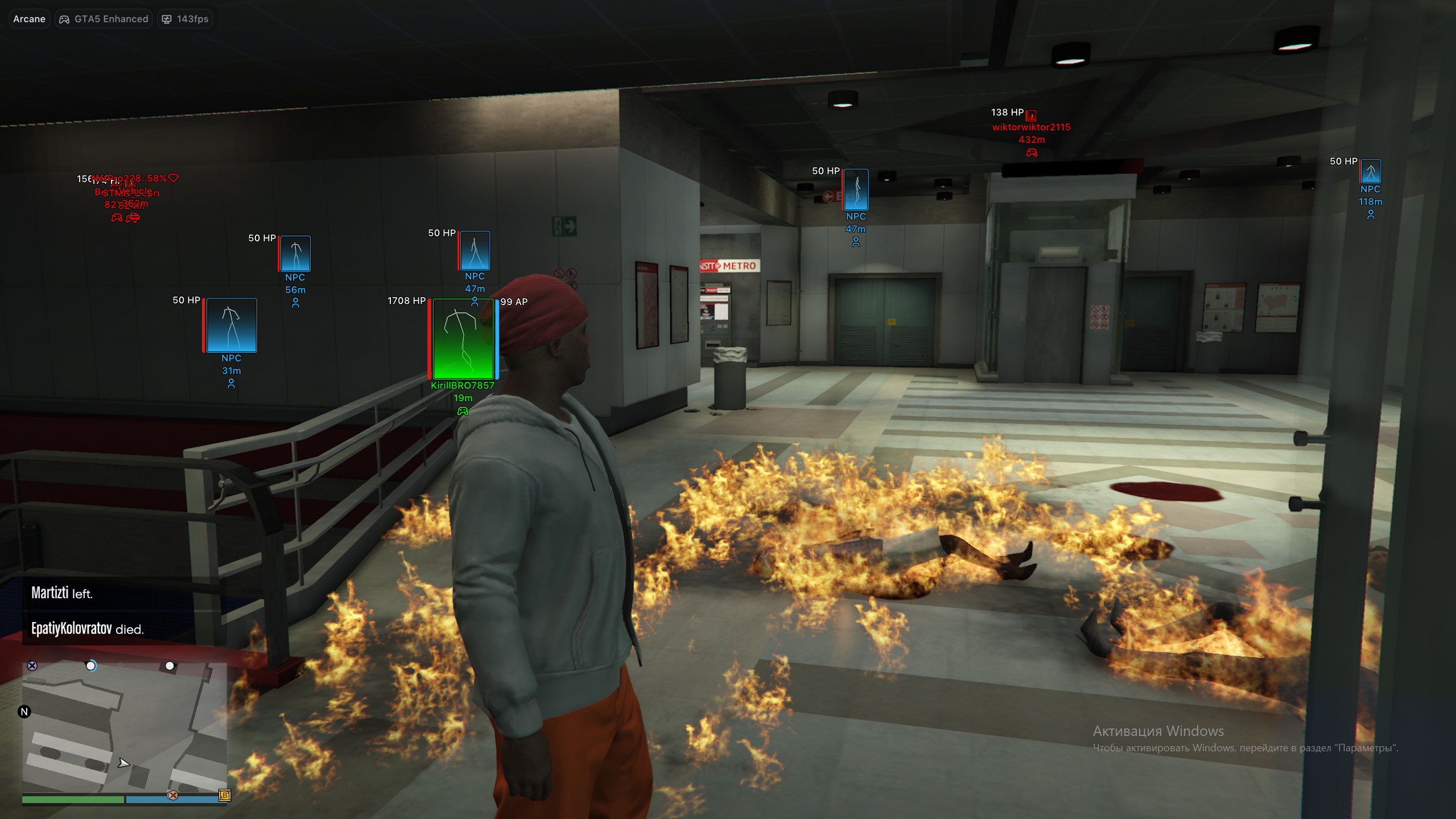
The menu includes a comprehensive Pedestrian ESP suite that provides detailed visual information for network players, NPCs, and animals. Display names, distances, health and armor bars, skeleton overlays, bounding boxes, and customizable render distances help users maintain complete situational awareness. Extensive color customization and multiple display styles allow every aspect of the ESP to be tailored for maximum visibility and performance.
For tracking vehicles, pickups, and world objects, Arcane features a dedicated Entities ESP System. Monitor weapons, ammo, money pickups, health items, vehicles, and passengers with customizable colors, render distances, and information displays. Vehicle ESP supports both network and NPC vehicles while offering detailed passenger rendering options for enhanced battlefield awareness.
Arcane also provides an extensive collection of Gameplay Utilities including Infinite Health, Infinite Armor, Infinite Stamina, Infinite Vehicle Health, Speedhack functionality, waypoint teleportation, Never Wanted mode, Instant Death hotkeys, and configurable damage modifiers. The integrated Battle Mode further enhances competitive gameplay by filtering unnecessary entities and focusing visual information on critical targets.
The built-in HUD Customization System allows users to personalize their interface with multiple crosshair styles, color adjustments, hover indicators, opacity controls, and sizing options. Combined with DPI scaling support, FPS monitoring, language selection, theme customization, and flexible menu layouts, Arcane delivers a polished and fully customizable user experience.
To complete the package, Arcane includes a robust Configuration Manager that enables users to create, save, edit, launch, share, and organize custom profiles. Whether you're optimizing settings for combat, exploration, or general gameplay, Arcane makes it easy to switch between configurations instantly while keeping your preferred setup organized and accessible.
GTA V Arcane Menu combines advanced aimbot functionality, powerful ESP systems, extensive gameplay utilities, HUD customization, and flexible configuration management into one feature-rich solution, giving users complete control over their GTA V experience.
Already purchased?
Read our setup guide here (visible to customers only):
Official Arcane: Grand Theft Auto V Installation and Support Guide
-
Overview
- Supported game version: Steam, Epic Games, Social Club
- Supported game mode: Windowed / Borderless
- Supported CPU: Any
- Supported GPU: Any
- Minimal RAM: 12 GB
- Supported OS: Windows 10-11 x64
-
-
Aimbot
Advanced aiming options with custom targeting controls.
- Enabled
- Mode: On Hold, Always Aim
- Aim keybind
- Prediction
- Player lock
- Target NPCs
- Target Friends
- Aim with melee weapons
- Aim with throwable weapons
- Smoothness
- Max target distance
- Draw Aim FOV
- FOV color, thickness, and radius
- Target bone mode: Selected Bone, Closest Bone
- Selected bone: Head, Neck, Chest, Stomach
-
Pedestrians ESP
Visual overlays for players, NPCs, and animals.
- Network player ESP with names, distance, icons, health, armor, boxes, fill, and skeleton
- Friend drawing and player info customization
- NPC ESP with info, render distance, health, armor, boxes, fill, and skeleton
- Animal ESP with name, name color, render distance, and HP
-
Entities ESP
Track pickups, vehicles, and passengers with detailed display settings.
- Pickup ESP: weapons, ammo, money, health, and misc
- Per-category color and render distance
- Vehicle ESP for network vehicles and NPC vehicles
- Vehicle info: name, distance, and icon
- Draw self vehicle and empty vehicles
- Network and NPC passenger render modes
- Passenger info modes: Short, Detailed
-
Misc Features
Extra gameplay utilities and combat tools.
- Never Wanted
- Infinite Health, Armor, Stamina, and Vehicle Health
- Speedhack
- Teleport Waypoint keybind
- Instant Death keybind
- Battle Mode with keybind
- Hide animals, vehicles, NPCs, and pickups in Battle Mode
- No Spread and No Recoil
- Extended Damage with custom value
-
HUD
Customize your display, crosshair, and ESP visibility.
- Crosshair
- Crosshair color
- Crosshair styles: Plus, Circle, Dot, X Cross, Hollow Cross, Galactic Compass, Triangle
- Crosshair size and thickness
- Reduce ESP opacity when hovered
- Show hover circle
- Hover radius
-
Settings
Full menu control with layout, theme, language, and update options.
- Menu keybind
- Unload keybind
- DPI scale: 100%, 125%, 150%
- Show FPS
- Theme: Murky, Sunny
- Watermark
- Menu language: EN, RU, CN
- Menu layout: 2 columns, 1 column
- Update list / Patch notes
-
Configuration
Create, save, manage, and share custom configs.
- Sort by created date
- Create new
- Launch
- Save
- Edit name
- Share
- Remove
-
Need help before purchasing? Learn more about Grand Theft Auto V cheats, including features, setup guidance, and compatibility information. · How access works · FAQ · Customer Support